我们知道istio可以通过istioctl来安装,也可以通过helm-chart来安装各个组件,还可以用operator模式安装istio,这里讲的就是使用operator来安装istio,相当于通过CRD来初始化istio。
首先从github上下载Istio最新的包 Istio Releases ,写这篇文章时我用的是 1.7.2 这个版本,
比如我在我的M1的Mac上下载的是 istio-1.17.2-osx-arm64.tar.gz,解压后可以看到
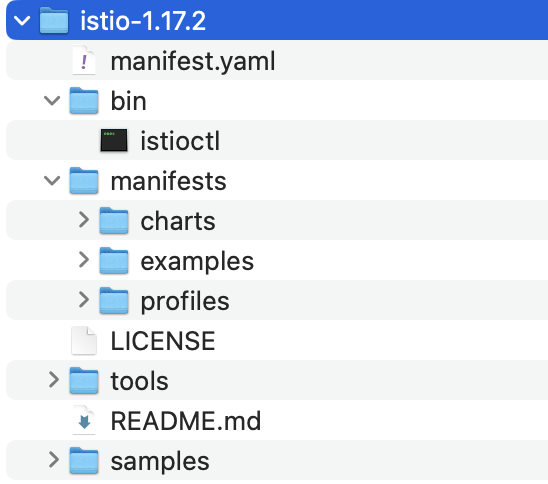
我们可以通过manifests文件夹里的istio-operator chart来安装我们的istio-operator,
# 创建namespace
kubectl create namespace istio-operator
kubectl create namespace istio-system

# 进入文件夹
cd istio-1.17.2

# 将istio-operator安装在istio-operator这个ns
helm install istio-operator manifests/charts/istio-operator \
 --set watchedNamespaces="istio-namespace1\,istio-namespace2" \
 -n istio-operator
注意,这里我们可以传入watchedNamespaces属性来覆盖chart里的默认值istio-system,这个配置的含义是知道istio-operator监听指定的ns下面的crd来完成istio环境的初始化,比如我们–set watchedNamespaces=”istio-test-rev”的话,
helm install istio-operator manifests/charts/istio-operator \
 --set watchedNamespaces="istio-test-rev" \
 -n istio-operator
之后我们在istio-test-rev这个ns中新建 install.istio.io/v1alpha1 IstioOperator 这个 CRD 的话,istio operator就能根据crd生成istio资源,如果在其他ns比如istio-system中新建IstioOperator crd的话就会被忽略。
helm list -n istio-operator
NAME            NAMESPACE       REVISION        UPDATED                                 STATUS          CHART                   APP VERSION
istio-operator  istio-operator  1               2023-04-27 14:01:06.053175 +0800 CST    deployed        istio-operator-1.17.2   1.17.2

kubectl get deployment -n istio-operator
NAME             READY   UP-TO-DATE   AVAILABLE   AGE
istio-operator   1/1     1            1           51m
这里看到安装完之后会有个deployment来运行istio operator pod,到这里我们operator就准备好了,那么开始新建一个istio mesh。
IstioOperator的详细字段说明
https://istio.io/latest/docs/reference/config/istio.operator.v1alpha1/
kubectl apply -f - <<EOF
apiVersion: install.istio.io/v1alpha1
kind: IstioOperator
metadata:
  namespace: istio-test-rev
  name: istio
spec:
  profile: demo
EOF

istiooperator.install.istio.io/istio created
这里简单的使用一个内建的profile ”demo“ 来初始化我们的istio环境,注意看我们的namespace指定的是之前的watchedNamespaces,然后可以看到istio-system这个ns下会有istio的ingressgateway/egressgateway/istiod的pod在运行。
kubectl get services -n istio-system
NAME                   TYPE           CLUSTER-IP      EXTERNAL-IP      PORT(S)   AGE
istio-egressgateway    ClusterIP      10.96.65.145    <none>           ...       30s
istio-ingressgateway   LoadBalancer   10.96.189.244   192.168.11.156   ...       30s
istiod                 ClusterIP      10.96.189.20    <none>           ...       37s

kubectl get pods -n istio-system
NAME                                   READY   STATUS    RESTARTS   AGE
istio-egressgateway-85649899f8-fddzr   1/1     Running   0          7m38s
istio-ingressgateway-f56888458-ljrwx   1/1     Running   0          7m38s
istiod-64848b6c78-7clvz                1/1     Running   0          7m41s
到这里我们的istio环境就简单初始化好了,但是大家可能会有个疑问,为什么指定的ns是istio-test-rev,但是资源都生成到istio-system下面了?
首先我们可以从manifests/profiles/demo.yaml这个路径看一下istio内建的demo profile都定义了什么,
更多内建的profile信息可以参考
https://istio.io/latest/docs/setup/additional-setup/config-profiles/
apiVersion: install.istio.io/v1alpha1
kind: IstioOperator
spec:
  meshConfig:
    accessLogFile: /dev/stdout
    extensionProviders:
    - name: otel
      envoyOtelAls:
        service: opentelemetry-collector.istio-system.svc.cluster.local
        port: 4317
    - name: skywalking
      skywalking:
        service: tracing.istio-system.svc.cluster.local
        port: 11800
  components:
    egressGateways:
    - name: istio-egressgateway
      enabled: true
      k8s:
        resources:
          requests:
            cpu: 10m
            memory: 40Mi

    ingressGateways:
    - name: istio-ingressgateway
      enabled: true
      k8s:
        resources:
          requests:
            cpu: 10m
            memory: 40Mi
        service:
          ports:
            ## You can add custom gateway ports in user values overrides, but it must include those ports since helm replaces.
            # Note that AWS ELB will by default perform health checks on the first port
            # on this list. Setting this to the health check port will ensure that health
            # checks always work. https://github.com/istio/istio/issues/12503
            - port: 15021
              targetPort: 15021
              name: status-port
            - port: 80
              targetPort: 8080
              name: http2
            - port: 443
              targetPort: 8443
              name: https
            - port: 31400
              targetPort: 31400
              name: tcp
              # This is the port where sni routing happens
            - port: 15443
              targetPort: 15443
              name: tls

    pilot:
      k8s:
        env:
          - name: PILOT_TRACE_SAMPLING
            value: "100"
        resources:
          requests:
            cpu: 10m
            memory: 100Mi

  values:
    global:
      proxy:
        resources:
          requests:
            cpu: 10m
            memory: 40Mi

    pilot:
      autoscaleEnabled: false

    gateways:
      istio-egressgateway:
        autoscaleEnabled: false
      istio-ingressgateway:
        autoscaleEnabled: false
根据IstioOperator CRD的字段含义,demo profile的components里定义了egressgateways、ingressgateways和pilot,但是没有指定namespace,所以默认使用了istio-system这个ns。如果说我们想让istio的组件运行在不同的ns里,我们可以自己指定ns,比如我们定义一个demo-1.yaml文件如下
apiVersion: install.istio.io/v1alpha1
kind: IstioOperator
metadata:
  name: demo-1
  namespace: istio-test-rev
spec:
  profile: default
  components:
    egressGateways:
      - name: istio-egressgateway
        namespace: istio-test-rev
        enabled: true
        k8s:
          resources:
            requests:
              cpu: 10m
              memory: 40Mi
在这个IstioOperator CRD里对istio-egressgateway指定了ns为istio-test-rev,接着我们
# 先把之前创建的mesh删掉,不然default和demo会共存共用istio-system下的istiod和ingressgateway,导致后续如果删除任意一个mesh会把共用的component也删除,比较麻烦
kubectl delete IstioOperator istio -n istio-test-rev
istiooperator.install.istio.io "istio" deleted

kubectl apply -f manifests/profiles/demo1.yaml
istiooperator.install.istio.io/demo-1 created

kubectl get pods -n istio-test-rev
NAME                                   READY   STATUS    RESTARTS   AGE
istio-egressgateway-676bcd4984-wfml6   1/1     Running   0          13s

kubectl get pods -n istio-system
NAME                                    READY   STATUS    RESTARTS   AGE
istio-ingressgateway-6974766b9c-dj2b6   1/1     Running   0          17s
istiod-5987b4bb4f-gpr77                 1/1     Running   0          21s
可以看到我们使用了default的profile(profile不填时也是默认使用default这个profile),根据default profile的默认定义,
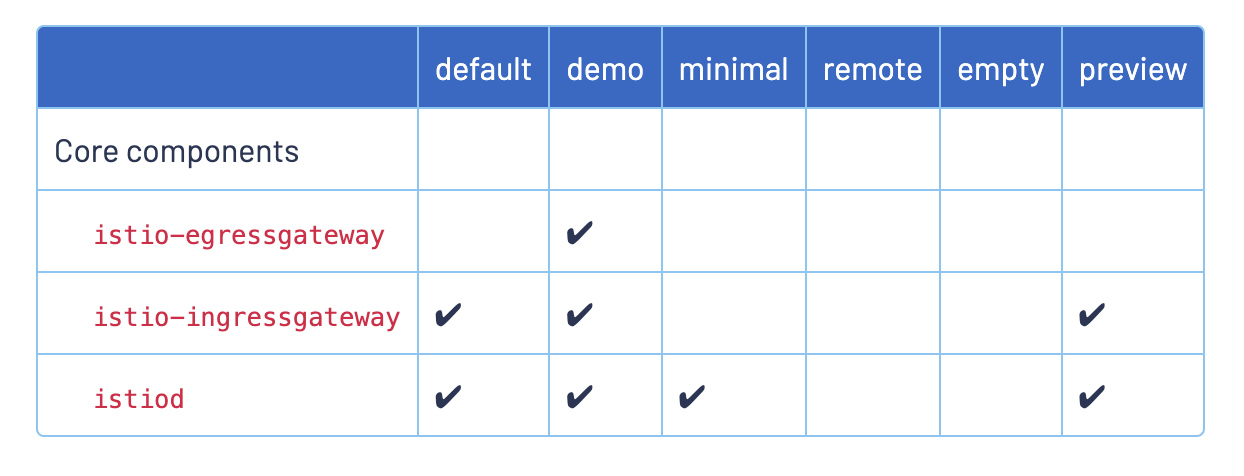
会默认帮我们生成和demo profile一样的istiod和ingressgateway pod,所以这2个component不变,但是我们自定义了egressgateway,且指定了namespace,所以在istio-test-rev下生成了egressgateway pod。
本文参考

翻译的不错